
Twenty tabs, one sentence
There is a particular kind of afternoon. You have twenty tabs open and a thing you need done: find the invoice from March, check whether the refund landed, pull the number you were emailed about last week, cancel the subscription you forgot about. None of it is hard. All of it is yours — your accounts, your sessions, your passwords — and you are doing it by hand, one tab at a time, because that is the only way to reach the inside of a site you are signed in to.
Brotto exists because that afternoon is a sentence.
Find the invoice from March, and check whether the refund landed.
Why the obvious alternative asks for your password
The obvious way to build this is a browser in a data centre. You give it a URL and it opens the page. And then it hits the wall — because a browser nobody has ever used has no cookies, no reputation, and no way past the front door.
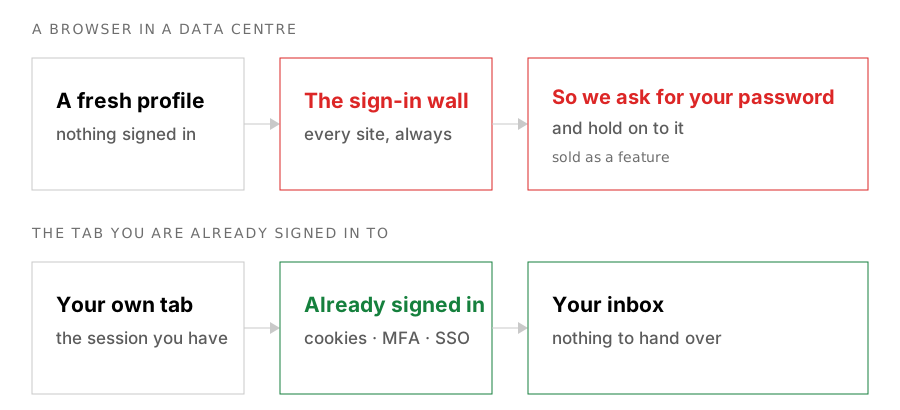
Both halves of that problem — no session, and no reputation — have the same fix in the industry, and the fix is to ask you for your credentials and store them.
I think that is the wrong shape, and not only because handing a third party your Google password is a bad idea in the way that handing a stranger your house keys is a bad idea. It is bad because the thing you wanted — reach the inside of a site you are signed in to — is something you already had. The session was sitting in your browser the entire time. The credential vault exists to work around a limitation of where the browser runs, and then it gets sold as a feature.
So Brotto runs somewhere else: in the tab you are already signed in to. A Chrome extension, driving the browser you already have open, against the accounts you already have. Your cookies, your MFA, your SSO are simply there — there is nothing to sign in to, and nothing to hand over.
That is the whole design decision, and most of what follows from it is a consequence rather than a feature.
It reads the page, but not by looking at it
One more thing decides what this can and cannot do, and it is worth knowing because it is visible in every run.
Brotto does not take screenshots and ask a vision model to read them. It reads the accessibility tree — the roles, labels, values and references that a screen reader already navigates by.
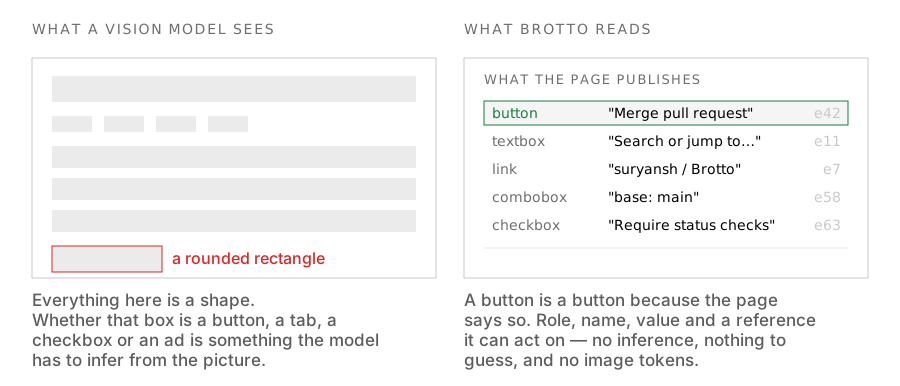
A button is a button because the page says it is one, not because something guessed that a rectangle is probably a button.
No vision model, no image tokens, no cost that scales with the size of the window. And a specific failure mode disappears rather than being reduced: it is much harder for a page to look like something it is not when what gets read is the structure the page publishes rather than the picture it paints.
One run, start to finish
This is a real task, not a demo: Brotto adding a branch protection ruleset to its own public repository, recorded end to end. Four things happened.
You ask for it in a sentence. There is no form and no workflow to learn. The panel is a chat box, and whatever you can describe is the whole interface.
It asks before it leaves. GitHub is the first domain this run touches, so it stops and waits. The reason to gate the domain and not the action is worth a sentence: a malicious instruction does not arrive from a search engine, it arrives from a page the agent was sent to. If it cannot reach an unfamiliar domain without asking you, that whole class of problem shrinks considerably.
It stops again when the page offers a choice. GitHub has two ways to add branch protection, and guessing wrong means clicking back through settings. Rather than pick one silently, it hands you the question. This is the same card you would get for a sign-in it cannot pass — the panel is a conversation, not a log.
It finishes, and the whole thing is on your disk. Note where the ruleset was written: on github.com, by your own session, with your own permissions. Nothing was sent to us. On a self-hosted install — the run above — the record is written to your own machine beside everything else you keep, which is what lets you read it back afterwards, pick up one that got interrupted, or delete it outright.
Fourteen steps, 377 seconds of the agent working, 41% of the context window used — and two stops, both on decisions only you could make. That is the shape I want by default: the agent is willing, and it is not the one holding the authority when it matters.
I have kept the screens out of this post on purpose. It is one run, and the panel showing seven identical-looking cards is better judged in motion than in a row of stills — the screens page has them, and it is a better use of your scroll than a gallery here would be.
What it asks about
Once a task is in flight there are three things it will stop for, and they all resolve in place, so the run reads as a conversation rather than a log.
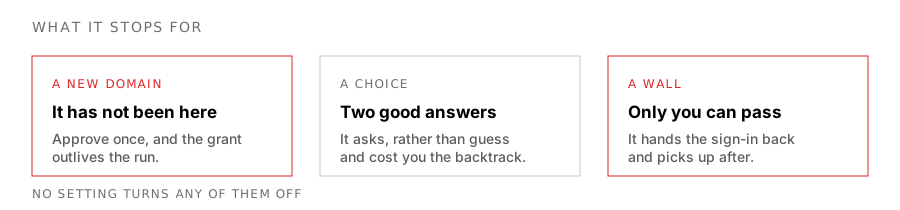
A domain it has not been to. Approve and it proceeds; deny and it does not ask again in this task. An approval sticks as an eTLD+1 grant afterwards, so you are not re-answering for github.com every week — which is also why the blocked-domains list is yours alone and has no server-side floor.
A question the page made ambiguous. Two equally good answers, and picking wrong costs you a click trip through settings. It puts the question to you instead, with a Skip if you would rather it just chose.
A wall that needs your credentials. This is the loop closing. When Brotto hits a sign-in it cannot pass, it stops and asks — which is exactly the moment the credential-vault products exist to automate away.
The part you should read before installing anything
An agent running in your signed-in session is not a sandbox. It acts with the authority you have, and if it is wrong, it is wrong as you. An email it sends is not flagged as suspicious, because it genuinely came from you.
I think that deserves more than a reassurance, so I went through the path line by line: what actually stops it, what does not, and the fact that every guard in it is ultimately a string test — including the ones I am proudest of. That write-up is the next post, and it is not written yet.
What it is not yet
I would rather these were here than discovered.
- There is no reliability number, and I am not going to invent one. Until the harness scores real runs against a real model, any percentage in this space — mine included — is a guess. What the run above shows is a shape, not a rate.
- Google Sheets is genuinely blind. It draws to a canvas, so there is no structure to read. Docs may be fine, because it renders a real DOM, but I have not verified it and will not claim it before I have.
- It needs a model key. Brotto does not sell tokens or mark them up; it supports eight providers, or any OpenAI-compatible endpoint you run yourself.
- Chrome only.
chrome.debuggerhas no Firefox equivalent.
Brotto is Apache 2.0 and stays that way. It is written out properly in the privacy policy and the security policy — including what it does not protect you from, which is the more useful half.