
Run it yourself
One container on your machine, about 510 MB — and the extension in Chrome. Free, permanent, Apache 2.0. No account, no operator, no cap. Everything Brotto keeps lands on your disk.
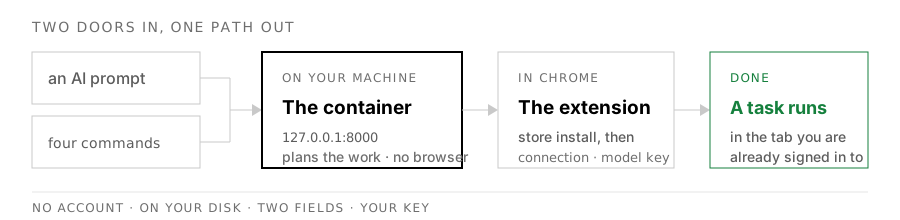
Let your AI do it
You do not have to read a terminal tutorial to run Brotto. If you use an AI coding tool (Cursor, Claude Code, Copilot, Windsurf — whatever you already have), paste the block below into it. The tool does the work; you paste two things into the extension yourself, at the end.
This sets up the server only. The extension is the next step and needs no agent — it installs from the Chrome Web Store in one click.
Set up Brotto's server on this machine. Brotto is an AI browser agent: a
Chrome extension talks to a small local server that runs the agent loop.

Prerequisite: Docker.

1. Clone https://github.com/suryanshgupta9933/Brotto and work in that
   directory.

2. Copy .env.example to .env. Generate a long random AGENT_SECRET — a
   password generator, or `openssl rand -hex 32`, is fine. Do not reuse a
   password I use anywhere else. Never commit the .env file.

3. Start the server: docker compose up -d

4. Confirm it answers: curl -s http://127.0.0.1:8000/health

5. Stop there. Tell me the server address (http://127.0.0.1:8000) and that
   AGENT_SECRET is what I will paste into the extension's Settings →
   Connection.

Do not paste a model API key into any file. I will add that myself in the
extension's Settings — it belongs there, not in .env.
Do it by hand
Same four commands. Docker is the only thing you need installed first.
git clone https://github.com/suryanshgupta9933/Brotto.git
cd Brotto

cp .env.example .env      # set AGENT_SECRET to any long random string
docker compose up -d
That is the whole server. It listens on http://127.0.0.1:8000
and never opens a browser of its own. Check it with:
curl -s http://127.0.0.1:8000/healthIf that answers, the server is up and the rest is the extension.
The extension
Two ways. The store install is the default path; building from source is there for people who want it.
Chrome Web Store — the easy path
Open the side panel and fill in two Settings screens:
Server address
http://127.0.0.1:8000, and paste the
AGENT_SECRET you generated.
Your model key
Your key, any of
the providers Brotto supports. Held in memory for
the run and never written to disk. It goes here, in the extension — not
in .env, and not in any file on the server.
Build it yourself — the other path
cd clients/brotto-extension
npm ci && npm run build
Then open chrome://extensions, turn on Developer mode,
and Load unpacked → clients/brotto-extension/dist. Same
settings as above.
Free, permanent, and yours
A browser agent that runs where you are already signed in, with no account and no operator on the other end. Free, permanent, Apache 2.0 — read it, fork it, ship it.
The same three gates
The gates that cannot be switched off are the same ones the cloud beta has, and the record of every run is a file on your disk.
Still to come
A one-command installer is planned, not built. Until it is, these are the steps. If you would rather skip them entirely, Brotto Cloud is the other door — same extension, someone else's server, invite-only while it is in beta.